
Close Your Formware and Disable New Responses
There are many reasons you might need to stop accepting submissions—perhaps your event is full, your deadline has passed, or you’ve gathered enough data. Formware makes it simple to take your form offline at any time.
How to Manually Close a Form
Section titled “How to Manually Close a Form”To disable new responses, follow these steps within the form builder:
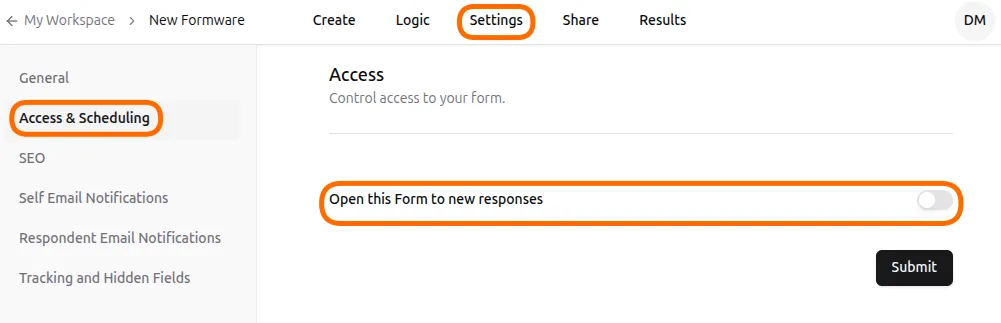
- Open Settings: Navigate to the Settings tab in the top menu of your form editor.
- Access Scheduling: Select Access & Scheduling from the left-hand navigation panel.
- Toggle Status: Find the option labeled Open this Form to new responses. Toggle this switch to the Off position to stop accepting entries.
- Save: Click the Submit button to save your changes.
What Respondents See
Section titled “What Respondents See”When a user attempts to visit a closed form, they will see a default message informing them that the form is no longer accepting responses. This ensures that users aren’t left wondering why they cannot access your questions.

Advanced Scheduling (Coming Soon)
Section titled “Advanced Scheduling (Coming Soon)”Looking to automatically close your form after 100 submissions or on a specific calendar date? We are working on advanced scheduling features to help you manage your data collection without manual intervention.