
Short Text Question
The Short Text question allows respondents to provide brief, single-line answers. It’s ideal for collecting concise information such as names, email addresses, phone numbers, or short responses.
This question type is best suited for questions that require a quick, straightforward answer.
Common use cases
Section titled “Common use cases”Use a Short Text question when you want to:
- Collect names, emails, or other short details
- Capture brief responses or single-word answers
- Ask numeric or short descriptive inputs
- Combine with other question types for structured forms
How to add a Short Text question
Section titled “How to add a Short Text question”- Open your form in the Formware editor.
- Click the
+ Add Contentbutton. - Select Short Text from the question types.
- Enter your question text and optionally add a description or placeholder.
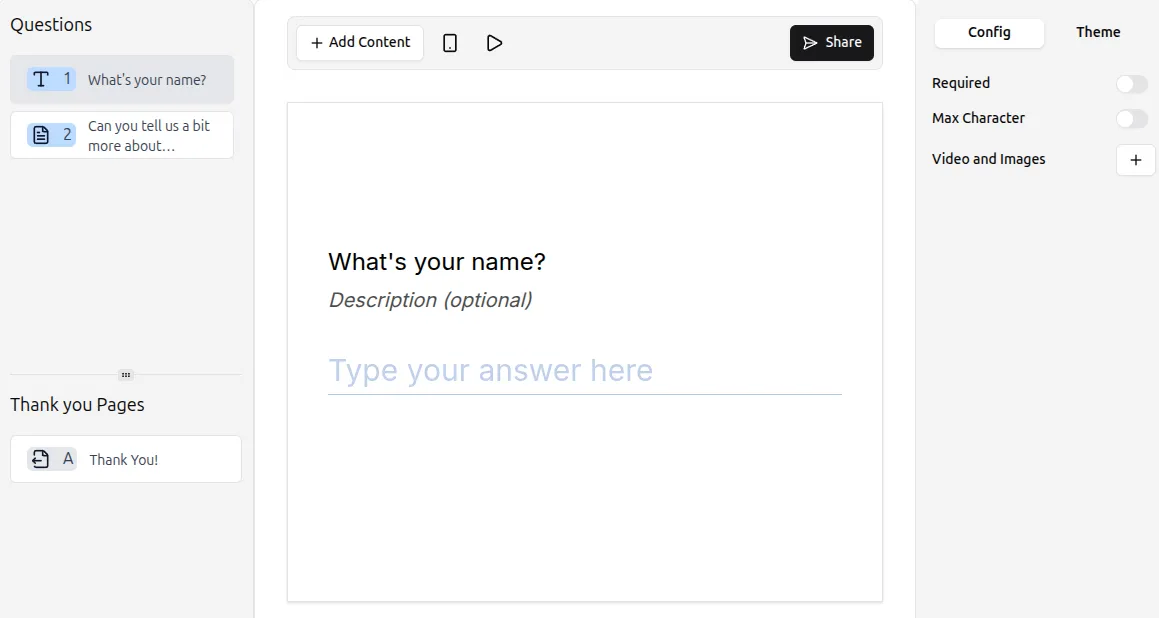
Respondents can type a single-line answer in the input field.
Configuring Short Text settings
Section titled “Configuring Short Text settings”The Config tab in the right-hand panel allows you to adjust the following options:
Make the question required
Section titled “Make the question required”Enable the Required toggle to prevent respondents from skipping this question.
Set a character limit
Section titled “Set a character limit”By default, Short Text responses have no character limit. To restrict the length:
- Toggle Max characters in the settings.
- Enter the maximum number of characters allowed (e.g., 100 characters).
This ensures answers stay concise and consistent.
Add media (optional)
Section titled “Add media (optional)”You can also include images or videos to provide context or clarify your question:
- Click Add next to Videos and Images in the question settings.
- Upload relevant media.
For more guidance, see: Add Images and GIFs
Tips for Short Text questions
Section titled “Tips for Short Text questions”- Keep your prompt clear for accurate responses.
- Use a character limit when you want to control input length.
- Avoid asking for long answers—use a Long Text question for detailed responses.