
Remove Formware Branding from Your Forms
By default, forms created with Formware include a “Powered by Formware” button on every page of your form. With Formware Pro, you can remove this branding to create a fully white-label experience that aligns with your brand.
How to remove Formware branding
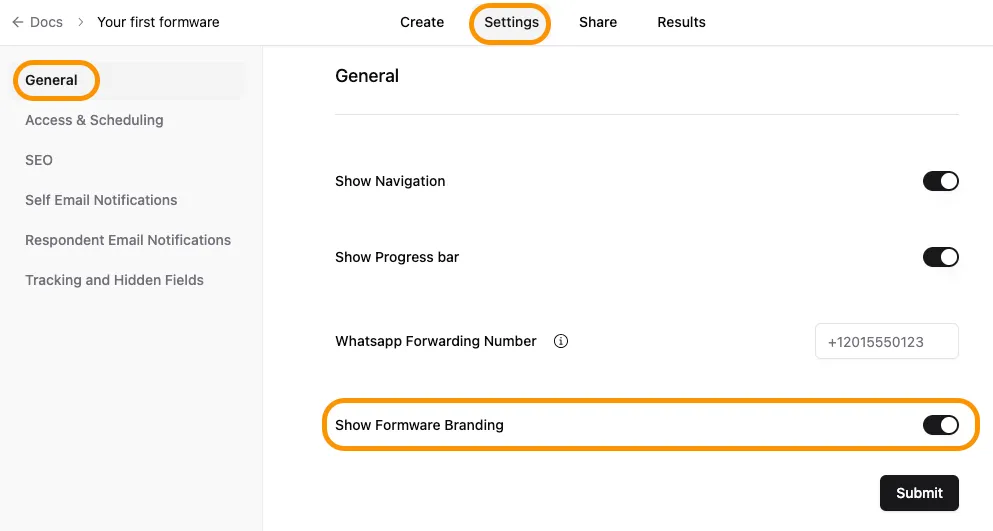
Section titled “How to remove Formware branding”- Open your form in the editor.
- Go to the Settings tab.
- Disable the Show Formware Branding toggle button.
Upgrade required
Section titled “Upgrade required”The option to remove branding is only available on paid plans.
To upgrade:
- Click Upgrade Plan in the navigation bar
- Choose your desired billing cycle (monthly vs yearly)
- Return to your form settings and disable the Show Formware Branding option
What changes when branding is removed
Section titled “What changes when branding is removed”- The “Powered by Formware” button is no longer shown
- Your form appears fully branded to your business
- Respondents see a cleaner, more professional interface
When to remove branding
Section titled “When to remove branding”Removing branding is useful when:
- You want a fully white-label experience
- You’re sharing forms with clients or customers
- Brand consistency is important for your business
If you’re using forms internally or for quick data collection, keeping the default branding is usually fine.