
How to Send Form Responses to WhatsApp (Instant Notifications)
Want to receive form responses directly on WhatsApp instead of checking dashboards or email?
With WhatsApp forwarding, every form submission is instantly sent to your WhatsApp number — so you can respond to leads, inquiries, or bookings in real time.
In this guide, you’ll learn how to connect your form to WhatsApp and start receiving notifications instantly.
Step 1: Open Your Form Settings
Section titled “Step 1: Open Your Form Settings”Log in to your Formware account and open the form you want to connect.
Click on the Settings tab in the form editor.
Step 2: Add Your WhatsApp Number
Section titled “Step 2: Add Your WhatsApp Number”Find the WhatsApp Forwarding Number field.
Enter your WhatsApp number:
- Include your country code
- Do not add spaces or special characters
Example: +919876543210
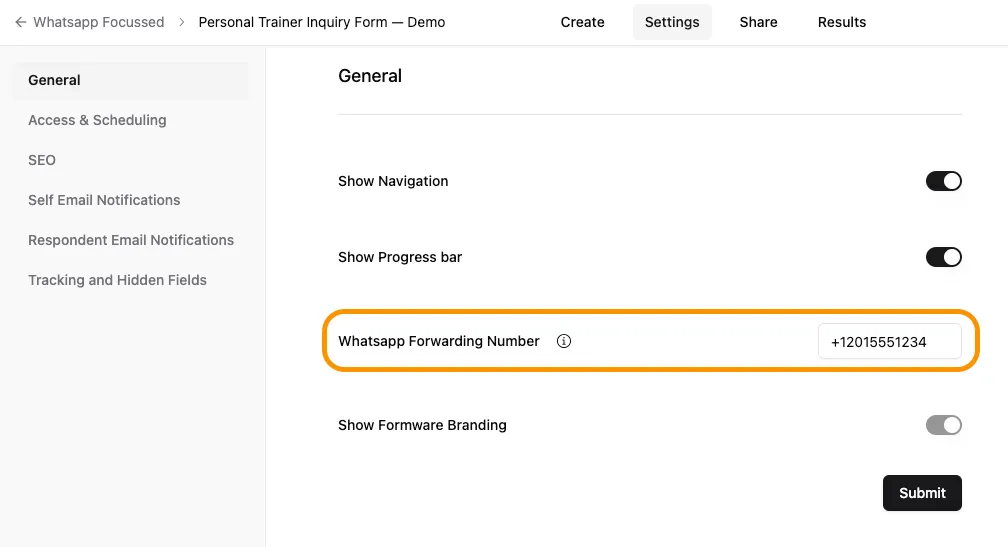
Step 3: Save and Test
Section titled “Step 3: Save and Test”Save your changes and submit a test response.
Once configured:
- Every new submission will be sent to your WhatsApp
- You’ll receive messages instantly
- You can reply directly to leads from WhatsApp
How It Works
Section titled “How It Works”When someone fills out your form:
- The response is captured in Formware
- The data is instantly forwarded to your WhatsApp
- You receive it as a message and can respond immediately
For best results, combine this with a widget → Embed WhatsApp widget
Why Send Form Responses to WhatsApp?
Section titled “Why Send Form Responses to WhatsApp?”WhatsApp is one of the fastest ways to respond to leads and customer inquiries.
Here’s why businesses use WhatsApp forwarding:
- Instant notifications – get alerted the moment someone submits a form
- Faster response times – reply directly from your phone
- Higher conversions – respond while the lead is still active
- No dashboard dependency – no need to log in repeatedly
This is especially useful for small businesses, freelancers, and teams that rely on WhatsApp for daily communication.
Use Cases
Section titled “Use Cases”WhatsApp forwarding is ideal for:
- Lead generation forms – capture and respond instantly
- Service inquiries – answer customer questions quickly
- Appointment bookings – confirm and follow up faster
- Local businesses – manage all communication in WhatsApp
Do I need WhatsApp Business for this?
Section titled “Do I need WhatsApp Business for this?”No, but using WhatsApp Business is recommended for better organization and automation.
Are responses sent in real time?
Section titled “Are responses sent in real time?”Yes. Form submissions are forwarded instantly to your WhatsApp.
Can I use multiple WhatsApp numbers?
Section titled “Can I use multiple WhatsApp numbers?”Currently, forwarding is configured per form with a single number.
What happens if my number is incorrect?
Section titled “What happens if my number is incorrect?”You won’t receive messages, so make sure the country code and number are correct.
Can I turn this off anytime?
Section titled “Can I turn this off anytime?”Yes. You can update or remove your WhatsApp number from the settings at any time.