
NPS question type
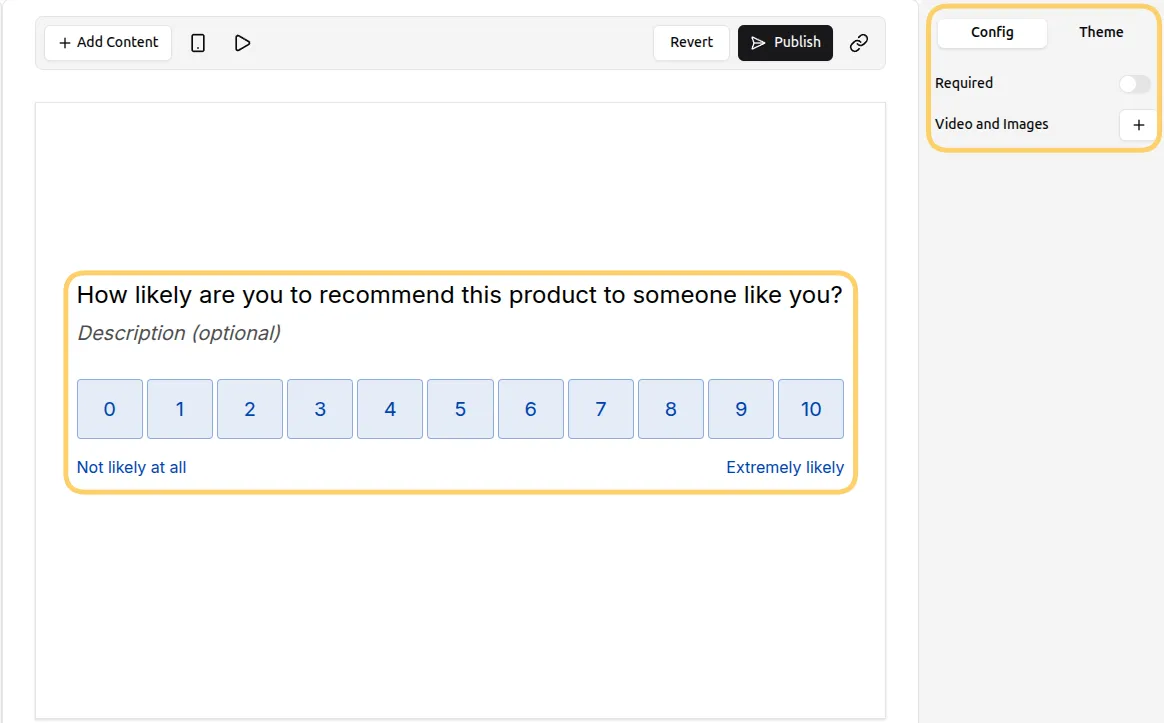
The NPS (Net Promoter Score) question type lets you measure customer loyalty using a standard 0–10 rating scale.
It’s commonly used in surveys to understand how likely someone is to recommend your product, service, or experience.
What is an NPS question?
Section titled “What is an NPS question?”An NPS question asks:
“How likely are you to recommend this to a friend or colleague?”
Respondents select a number from 0 (not likely) to 10 (very likely).
NPS score categories
Section titled “NPS score categories”Based on the response, users are grouped into:
- Promoters (9–10): Highly satisfied and likely to recommend
- Passives (7–8): Satisfied but not enthusiastic
- Detractors (0–6): Unhappy or at risk of churning
This makes it easy to quickly assess overall customer sentiment.
How to add an NPS question
Section titled “How to add an NPS question”- Open your form and click
+ Add Content. - Select NPS from the question type list.
- A 0–10 rating scale will be added to your form.
Customize the NPS question
Section titled “Customize the NPS question”You can adjust the NPS question to fit your survey:
Edit the question text
Example: “How likely are you to recommend our product?”Add a description
Provide context or explain how the feedback will be used
Make the question required
Section titled “Make the question required”To ensure you collect responses from every user:
- Enable the Required option in the question settings
Respondents won’t be able to continue without selecting a score.
Collect better feedback with a follow-up question
Section titled “Collect better feedback with a follow-up question”NPS scores are more useful when paired with a follow-up.
Add a second question such as:
- “What is the main reason for your score?”
You can:
- Use a Long Text question for detailed responses
- Show it conditionally based on the selected score
This helps you understand the reason behind the rating, not just the number.
When should you use an NPS question?
Section titled “When should you use an NPS question?”Use NPS when you want a quick, standardized measure of customer sentiment.
Common use cases:
- Customer satisfaction surveys
- Post-purchase feedback forms
- Product or feature feedback
- Onboarding or support experience surveys
Tips for higher-quality NPS responses
Section titled “Tips for higher-quality NPS responses”- Ask the NPS question early or at key moments (not buried in long forms)
- Keep surrounding questions minimal
- Always include a follow-up question
- Use consistent wording if you are tracking NPS over time
Add images or videos
Section titled “Add images or videos”You can add visuals to provide context or improve engagement:
- Click the
+next to Videos and Image. - Upload images or videos to enhance the question.