
Self email notifications
Formware offers two types of email notifications: self email notifications and respondent email notifications. With self email notifications, you will receive an email each time someone submits your form.
How it works
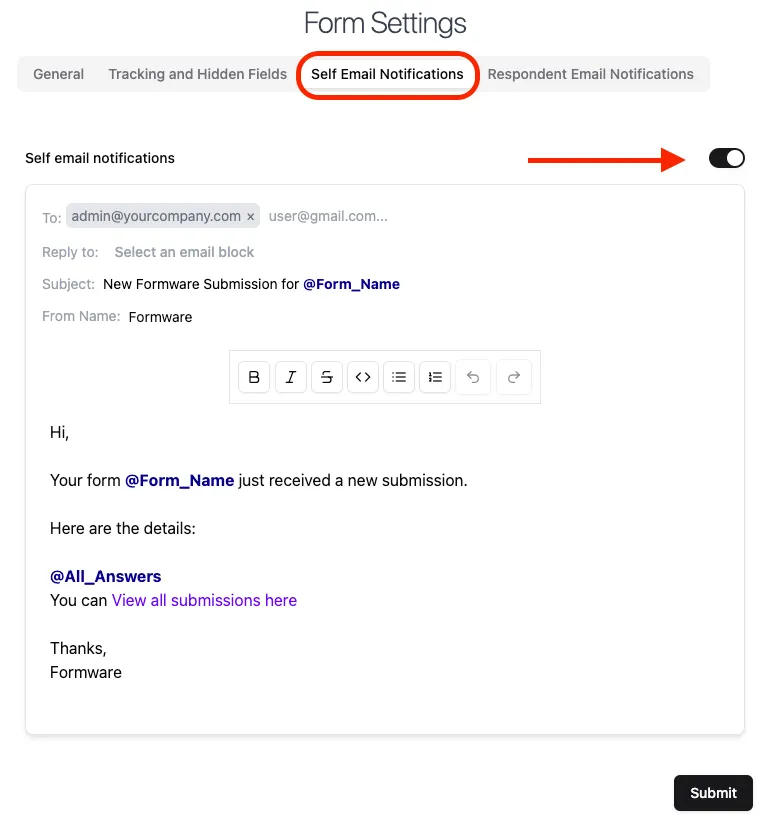
Section titled “How it works”Go to your form settings and click on Self Email Notifications tab. Here you can turn on the Self email notifications toggle to receive emails whenever someone submits your form. Once done, click on the Submit button at the bottom to save your preferences.
Customizing email fields
Section titled “Customizing email fields”An upgrade to Formware Pro is required enable the customization of email fields for self email notifications. Below are the different email fields you can modify.
To field
Section titled “To field”The email address of your Formware account is used as the default email address for receiving email notifications. To add new email addresses, simply paste a comma separated list or type the email addresses one by one.
Reply to
Section titled “Reply to”This field will be empty by default. If you have added one or more email question in your form, you can select it to set the Reply To value dynamically based on the respondent’s answer. This will allow you initiate a conversation with your respondents easily from your inbox by simply replying to the incoming email notifications.
Subject
Section titled “Subject”The default subject is New Formware Submission for @Form_Name. Emails are usually grouped by subject in a thread in your inbox. To split them up, insert a unique value in the subject, by typing @ and inserting a unique value in the subject, such as the @Submission_Id.
From name field
Section titled “From name field”By default, the emails are sent from Formware and the domain noreply@formware.io. You can customize the name of the sender, but the email domain of the sender is not customizable yet.
Email body
Section titled “Email body”All questions and answers are inserted in the body of email by default. Customize the content as you like and type @ to get a list of form data.