




What to Look for in an Alternative Tool
When evaluating alternatives to Notion Forms, consider these important features:
- Ease of Use: Does the tool provide an intuitive, user-friendly interface, or does it require working within rigid, pre-built frameworks like Notion’s page-based system?
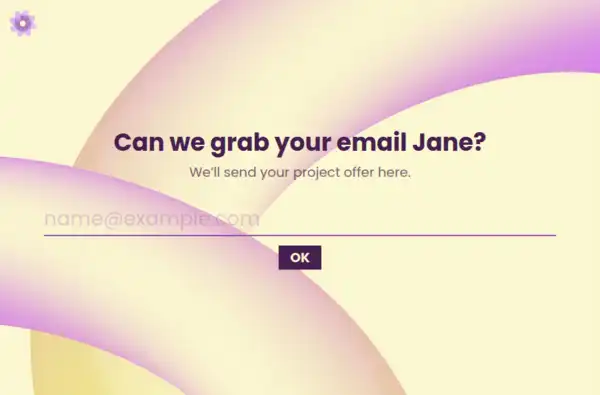
- Customizability: How much control do you have over the form’s design and layout? Can you adjust things like visuals, branding, and context for each question?
- Data Collection and Insights: Does the tool allow you to track partial responses, or does it only show completed data after submission?
- Pricing Flexibility: Does the tool offer unlimited responses for free, or is it bound by storage or usage limitations?
These factors will help you find a form builder that aligns with your needs, offering not just functionality but a better user experience and data collection flow.
Detailed Comparison: Formware vs Notion Forms
Customization & Branding
- Notion Forms: Offers limited customization options. The design is dependent on the Notion environment, and forms are often secondary to the page content, making it harder to create a branded experience.
- Formware: Provides complete design control, allowing you to tailor the colors, fonts, logos, and even backgrounds to perfectly align with your branding.
Form Experience & UX
- Notion Forms: Uses a page-based layout that mixes form fields with content, which can be overwhelming and distract users from the core task of completing the form.
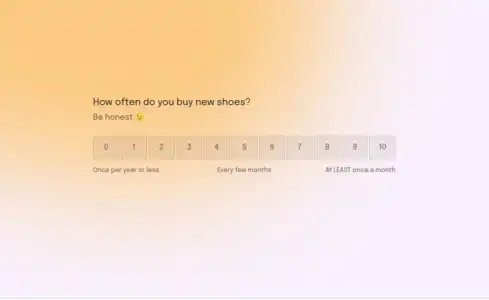
- Formware: One-question-at-a-time flow that maintains focus and keeps users engaged. This approach increases completion rates and response quality by guiding users step by step.
Data Capture & Analytics
- Notion Forms: Offers basic data collection within its page system, but there’s limited ability to track incomplete submissions or understand user intent before they complete the form.
- Formware: Automatically captures partial responses and provides insights into drop-offs, allowing you to improve your forms based on real user behavior.
Pricing & Volume
- Notion Forms: While the basic version is free, advanced features like increased storage or more complex form elements are behind paywalls. Additionally, response data is tied to the Notion workspace storage, which can limit flexibility.
- Formware: Provides unlimited responses for free, with no restrictions on form volume or storage. This makes it a more scalable solution without hidden fees as your data collection grows.
Who Benefits Most from Notion Forms
Notion Forms are best for:
- Notion users already immersed in the ecosystem: If you are already using Notion to manage pages, databases, and content, its built-in form capabilities can be convenient for quick data collection.
- Teams requiring basic, internal forms: Notion Forms can be sufficient for internal surveys and simple feedback collection within a workspace.
Who Benefits Most from Formware
Formware is ideal for:
- Businesses and teams looking for a more user-centric experience: If you want forms that are easy to complete and engage users, Formware’s conversational flow and focus on completion make it a better choice.
- Organizations needing complete branding control: Formware allows you to build forms that fit seamlessly with your brand, unlike Notion Forms, which are constrained by the platform’s aesthetic.
Best Use Cases for Formware
Client Onboarding
Formware’s conversational approach makes it perfect for client intake forms, guiding clients through a simple and engaging process while capturing essential information.
Event Registration
For event organizers, event registration forms in Formware provide an easy-to-navigate, branded experience that can increase conversions. With unlimited responses and easy sharing options, you can capture sign-ups without limits.
Surveys & Feedback
Formware’s ability to capture partial responses ensures you never miss valuable feedback. Whether you’re collecting customer satisfaction surveys or internal feedback, Formware’s question-by-question flow enhances response rates.
Market Research
Gather rich insights through market research forms with Formware’s advanced question types and unlimited submissions. Perfect for in-depth research without worrying about storage limitations.
Appointment Scheduling
Create appointment booking forms with clear steps and a smooth flow. With visual customizations and integrated embeds, your form fits naturally into your website, providing a seamless experience for your users.
Frequently Asked Questions
How does Formware improve the user experience compared to Notion Forms?
Formware uses a conversational flow, showing one question at a time, which keeps users engaged and reduces overwhelm. Notion Forms, however, use a page-based approach that can distract users with too much information at once, reducing completion rates.
Can I customize my forms with Formware?
Yes! Formware offers full customization options for each question, including the ability to add images, videos, and custom branding (logos, colors, and fonts), unlike Notion Forms which offer very limited design flexibility.
Does Formware track partial responses?
Yes! Formware automatically captures partial responses, so you can track where users drop off and improve your form accordingly. Notion Forms do not provide this level of visibility into incomplete submissions.
How does Formware compare to Notion Forms in terms of pricing?
Formware is completely free, offering unlimited responses with no paywalls or feature gating. Notion Forms is part of the Notion workspace, where advanced features, storage, and higher-tier functionalities require a paid plan.
Can I embed my Formware forms anywhere?
Yes! Formware allows you to easily embed forms into any website or landing page, making it versatile for a wide range of use cases. Notion Forms can be embedded, but the design limitations may not provide the same level of customization.